SPSS On-Line Training Workshop

SPSS On-Line Training Workshop |
|
 In this Tutorial:
|
In many computer languages like C++, we need to write a program and run the program just like a batch job. We obtain output and check if the results are what we need. If something is not done properly, we change the program and re-submit the job again until we obtain the results we need. In the SPSS for Windows, you can do the same thing with much less hustle. This is done by using the SYNTAX EDITOR window to obtain an SPSS Program. When do you need to create an SPSS program in a PC environment? All of the process you need from data entry, data manipulation, and data analysis to output results can be done using Pull-Down menus as demonstrated in previous movie clips. However, if you need to conduct the same analysis more than one time, you may find SPSS Program very handy. This allows you to run the same program as many times as needed. It also allows you to make minor changes for various analyses and then rerun the program. Click on the following movie clip to learn how to create an SPSS syntax program, modify and execute the program, as well as how to locate the SPSS programs, called Journal Files, that are automatically saved by SPSS. |
In this on-line workshop, you will find many movie clips. Each movie clip will demonstrate some specific usage of SPSS.
Creating an SPSS program using the Syntax Editor Window
The Syntax Editor window does not exist until you create an SPSS program. There are several ways to create an SPSS program in the SPSS/PC environment.
 |
Create SPSS program command lines when using the Pull-Down menu.
|
||||||||
|
|
Create SPSS program command lines by creating a new syntax editor window,
and key in an SPSS program.
|
||||||||
|
|
To
run an existing SPSS program which is not created using SPSS for Windows.
|
||||||||
|
|
You
have completed all the data entry, data manipulation, data analysis and
output results. Before you exit from the SPSS system, you feel like keeping
a copy of all the SPSS commands that you have conducted, but you did not
select “Paste” when you performed the activities. Are these SPSS commands
still available?
|
Running the SPSS commands in the Syntax Editor window
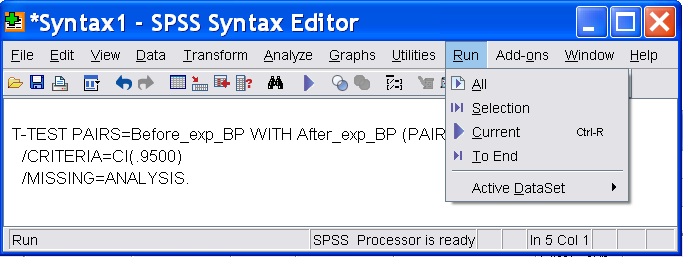
Once you have created any SPSS command lines in the Syntax Editor window, you can run ALL of the commands or run a selection of commands at any time.
 | To run all of the commands in the window: Go to the menu "Run" on the top of the Syntax window, choose "ALL" to run all commands. The results will appear in the Output Editor Window. |
| To run only part of the commands: First highlight the commands you wish to run, then go to the "Run" Menu, choose "Selection". The results will appear in the Output Window. |
This Journal, by default, is a file that appends all of your SPSS activities since you begin to use the SPSS for Windows the first time. This means that after a time period, this file may grow too large that it will occupy a large space in your hard drive.
In order to record ONLY the activities of the current session, you need to change an OPTION under the Edit Menu. (For information on the edit options, click on the MOVIE CLIP: Editing Options.)
| Go to the Edit menu; go down to “Options” to edit the Options for running SPSS program. |
| The
dialog box shows the “General” options, by default. Change the “Session
Journal” from “Append” to “Overwrite”. Click on “OK”. Note: You may simply use the default option for the Journal File using “Append” option if the hard disk space is not a problem. |
Click the following movie clip to learn how to create a Journal File.
|
Where to locate the Journal File? |
Go to “Edit” menu in the Data Editor Window and click on “Options…” This displays various options that are available. Click on “File Locations” tab. You will see the location of Session Journal file. You can click on “Browse…” to display the file name at its current location. Note that you will not be able to open the file until you are no longer running SPSS for Windows. You can copy this file “spss.jnl” at any other time to create your SPSS program in the Syntax Editor Window.
The following movie clip demonstrates how to locate the Journal File.


©This online SPSS Training Workshop is developed by Dr Carl Lee, Dr Felix Famoye , student assistants Barbara Shelden and Albert Brown , Department of Mathematics, Central Michigan University. All rights reserved.